


Native iOS App · In Development
TapXpense
Log an expense in seconds with a Back Tap — let on-device AI do the rest.
Overview
TapXpense is a native iOS expense tracker designed around one idea: logging a spend should take seconds, not minutes. Double-tap the back of your iPhone, speak or type the amount, and on-device AI categorises it automatically — no forms, no friction.
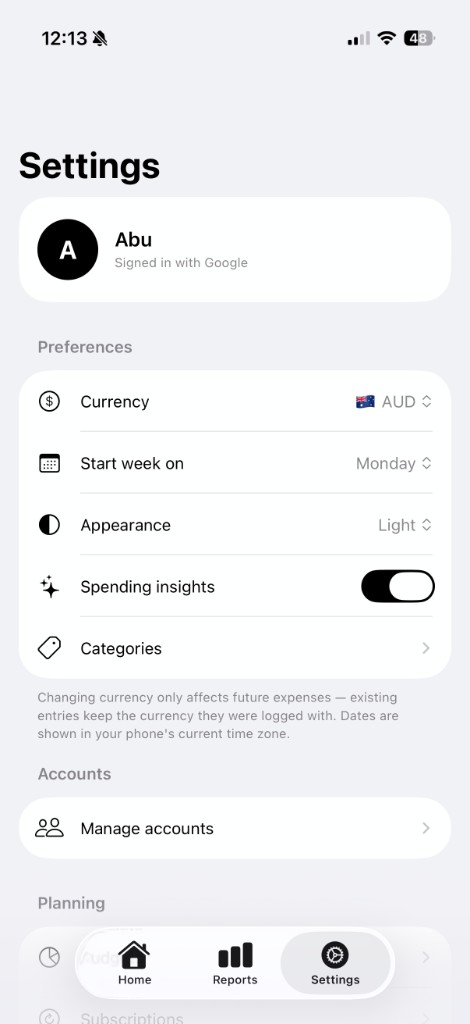
The app is offline-first — SwiftData is the source of truth, so it's fully usable with no account and no connection. Your data is also backed up to a private, encrypted cloud database that only you can access (isolated per-user with Row-Level Security), and signing in with Google syncs it across your devices. Categorisation runs on-device where supported, with a cloud fallback that only ever sees the short phrase you type. On top of fast logging sit budgets, spending insights, custom categories, recurring income, subscriptions, reminders, home-screen widgets and an AI financial report you can actually chat with.
Quick Facts
- Role: Solo designer & developer
- Platform: iOS 17+ (iPhone)
- Status: In development
- Privacy: On-device processing
- Sync: Private cloud backup; Google to sync
- Stack: Swift, SwiftUI, SwiftData
Problem & Motivation
Most people abandon expense trackers because logging is tedious — by the time you open the app, pick a category and type the details, the moment has passed. The result is half-empty data and budgets nobody trusts.
I wanted to remove every step between "I just spent money" and "it's recorded." Apple's Back Tap turns the phone itself into a logging button, and on-device AI removes the categorisation chore — while keeping the whole thing private and usable anywhere, even with no signal.
Core Features
Back Tap Quick-Log
Double- or triple-tap the back of your iPhone to log an expense instantly via an App Intent — no need to even open the app.
On-Device AI Categorisation
Expenses are parsed and categorised automatically, with worldwide merchant awareness and a keyword fallback that still works offline.
Budgets & Insights
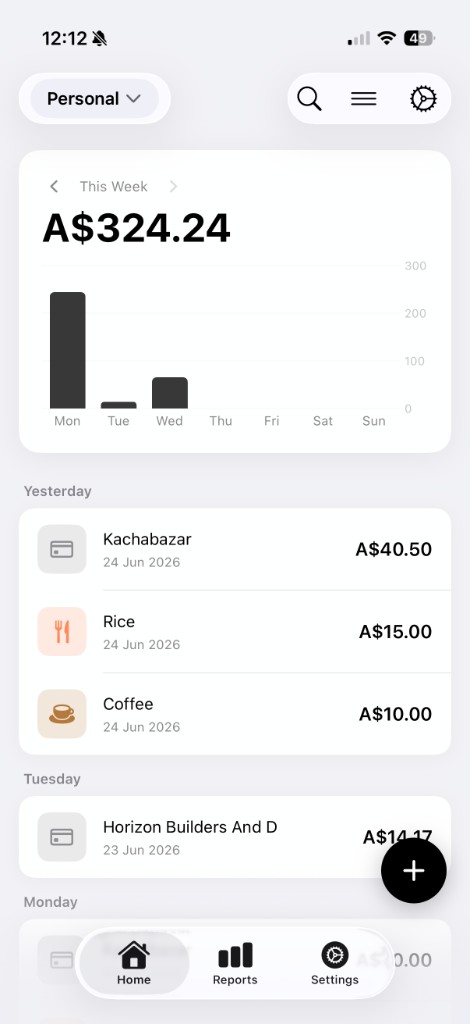
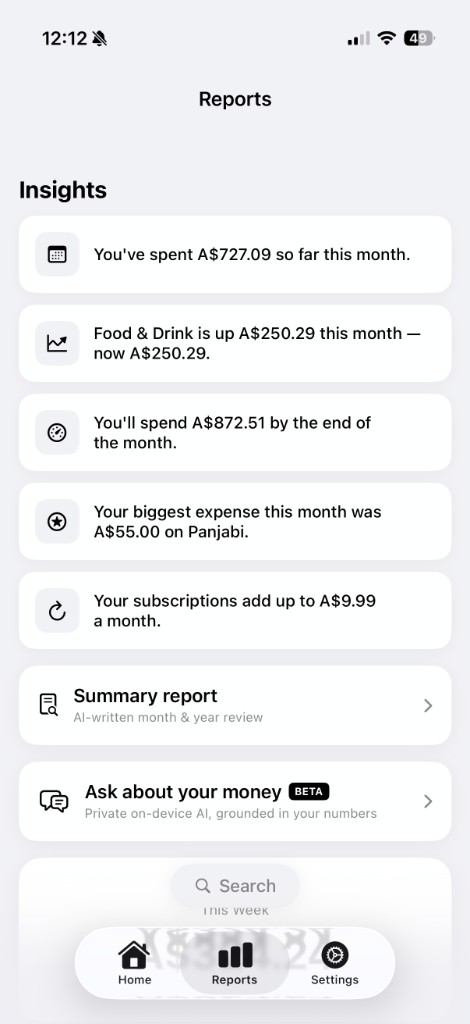
Monthly spending limits, month-over-month comparisons and anomaly nudges that tell you when you're spending more than usual.
Widgets & Apple Wallet
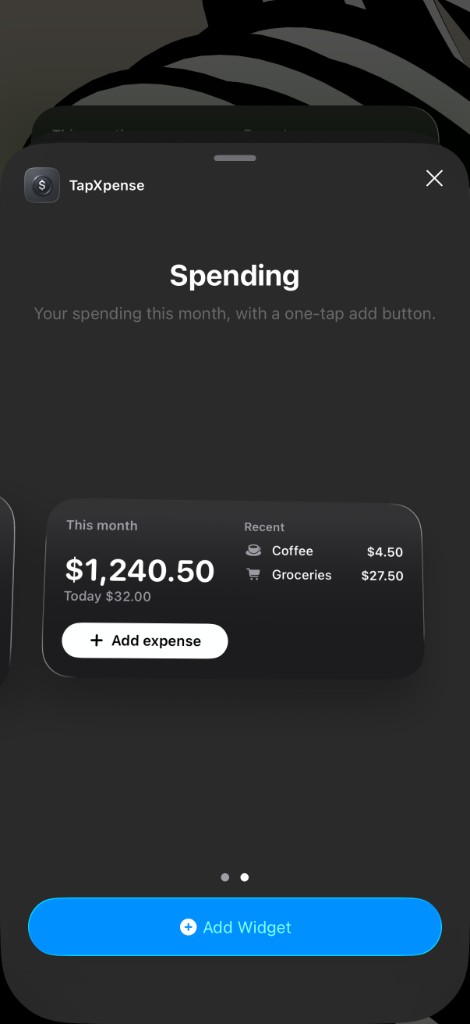
Home-screen and Control Center widgets for one-tap logging, plus automatic logging of Apple Wallet transactions.
Subscriptions, Income & Reminders
Track recurring subscriptions and salary, with reminders so renewals and pay-days are never a surprise.
AI Report & "Ask Your Money"
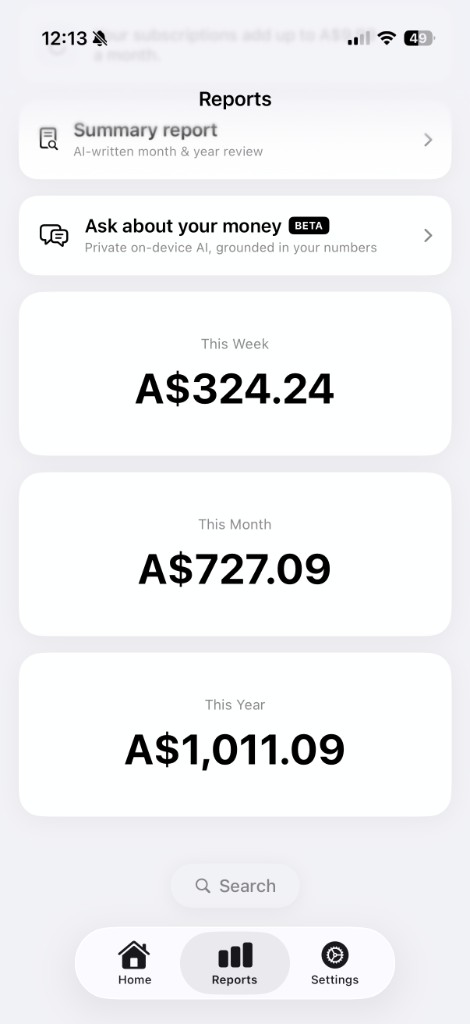
A generated financial report plus a private, on-device chat that answers questions about your own spending — backed by CSV export and dark mode.
Architecture Highlights
- • On-device first: SwiftData is the source of truth and the app's processing runs locally — no account or connection needed to use it.
- • Private by design: your data is isolated per-user with Row-Level Security so only you can access it — no ads, no tracking, no data selling.
- • App Intents + Back Tap: a Shortcuts-driven intent makes logging possible from outside the app entirely.
- • Encrypted cloud backup: your data is mirrored to a private Supabase database (per-user Row-Level Security); signing in with Google syncs it across your devices.
- • Guest-friendly: "Continue as Guest" lets you use everything anonymously — no name or email required.
App Screens & Demo
A nine-second walkthrough: log a coffee with a Back Tap straight from the lock screen, glance at the home-screen widget, then open the in-app dashboard.
Impact & Learnings
- • Full-stack iOS: from an on-device SwiftUI / SwiftData core to the optional cloud layer for Google users — Supabase auth, Postgres RLS and Deno Edge Functions.
- • Designing for friction: the hardest product problem wasn't features, it was removing the steps between intent and a saved record.
- • Sync is subtle: reconciling an offline-first local store with a remote mirror taught me a lot about conflict handling and data ownership.
Interested in TapXpense or building something similar? Let's talk.
Contact MePrivacy Policy for TapXpense
Last updated: 28 June 2026
In short: You can use TapXpense completely anonymously — no name and no email required. Your data is never sold, shared with advertisers, or used for tracking. It is saved on your device and, so it can sync and be backed up, in a private cloud database that only you can access. The sections below explain exactly what happens to your information.
This Privacy Policy describes how TapXpense (“we”, “our”, or “the app”) handles information when you use our mobile application. By installing or using TapXpense, you consent to the practices described below.
1. Information We Collect
On-device data. When you record an expense, the app stores the amount, title, category, payment method, account, date, and any optional notes locally on your iPhone using Apple’s SwiftData framework. Your name and preferred currency are stored the same way.
Account information. If you sign in with Google or Apple, we receive your name and email address (Apple lets you hide your real email) in order to identify your account and synchronise your data. If you continue as a guest, we create an anonymous account on our backend identified only by a randomly generated user ID; we do not collect your name or email.
Expense parsing. When you log an expense via the in-app form or via the Back Tap shortcut, the text you enter (for example, “10 for coffee”) may be sent to a third-party language-model API (OpenRouter, which routes to providers such as Anthropic Claude or Google Gemini) for the purpose of suggesting a category and icon. These requests do not include your name, email, account ID, or any other identifier — only the phrase you typed is transmitted. On supported devices this categorisation runs on-device and no text leaves your iPhone.
Notion (optional). If you choose to connect Notion, the expense details you sync — title, amount, currency, category, date, notes, and account name — are sent to the Notion database you select so they appear in your own workspace. We store an access token for your Notion workspace on our backend so syncing can work; disconnecting Notion in Settings deletes that token.
Diagnostic information. The app does not collect crash reports, analytics events, advertising identifiers, or device fingerprints. We do not integrate with any analytics SDK.
2. How We Use Your Information
We use the information described above only to:
- Display your expenses, accounts, and reports inside the app.
- Sync your data across the devices on which you sign in with the same account.
- Generate category suggestions for the expenses you log.
We do not use your data for advertising, profiling, or any form of targeted marketing.
3. How Your Information Is Stored
Your data is stored in two places:
- Locally on your device, in the app’s private container, encrypted by iOS at rest.
- In our Supabase backend (operated by Supabase, Inc.), in a private Postgres database protected by row-level security policies that ensure each user can only access their own rows. Connections are encrypted in transit using TLS 1.2 or higher.
Guest (anonymous) users’ data is stored under their anonymous user ID. If you uninstall the app and your iOS Keychain is not synced via iCloud Keychain, your guest session may not be recoverable.
4. Sharing With Third Parties
We do not sell, rent, or share your personal information with advertisers or data brokers. The app interacts with the following third-party services strictly to provide the functionality you have requested:
- Supabase, Inc. — backend storage and authentication.
- Google LLC — only when you choose to sign in with Google.
- Apple Inc. — only when you choose to Sign in with Apple.
- OpenRouter, Inc. and the underlying model provider (such as Anthropic or Google) — only to categorise the expense phrase you typed, when on-device categorisation is unavailable.
- Notion Labs, Inc. — only when you choose to connect Notion; your synced expense details are sent to the Notion database you select.
Each of these providers has its own privacy policy. We encourage you to review them.
5. Data Retention and Deletion
Your local data persists on your device until you delete the app or sign out. Your backend data persists until you delete it from within the app, sign out and re-register, or contact us to request account deletion. To delete all of your data:
- Delete every expense and account from inside the app, then sign out, or
- Contact us to request full account deletion (see Contact below).
Anonymous (guest) accounts that have been inactive for an extended period may be removed automatically by a scheduled cleanup process.
6. Children’s Privacy
TapXpense is not directed to children under the age of 13, and we do not knowingly collect information from anyone under 13. If you believe a child has provided us with personal information, please contact us so we can delete it.
7. Your Rights
Depending on where you live, you may have rights under the GDPR, CCPA, or similar laws — including the right to access, correct, or delete the personal data we hold about you, and the right to withdraw consent at any time. To exercise any of these rights, please contact us using the link below.
8. Changes to This Policy
We may update this Privacy Policy from time to time. The “Last updated” date at the top of this page will reflect any changes. Material changes will be communicated via an in-app notice on first launch after the change.
9. Contact
If you have any questions about this Privacy Policy or your data, please contact us.